背景

  • 近期公司进行资产盘点,需要协助统计网络中交换机的所有光模块,所以有了此脚本

需求

  • 网内主要使用的设备是华三和华为设备,需要统计这两种设备的端口光模块
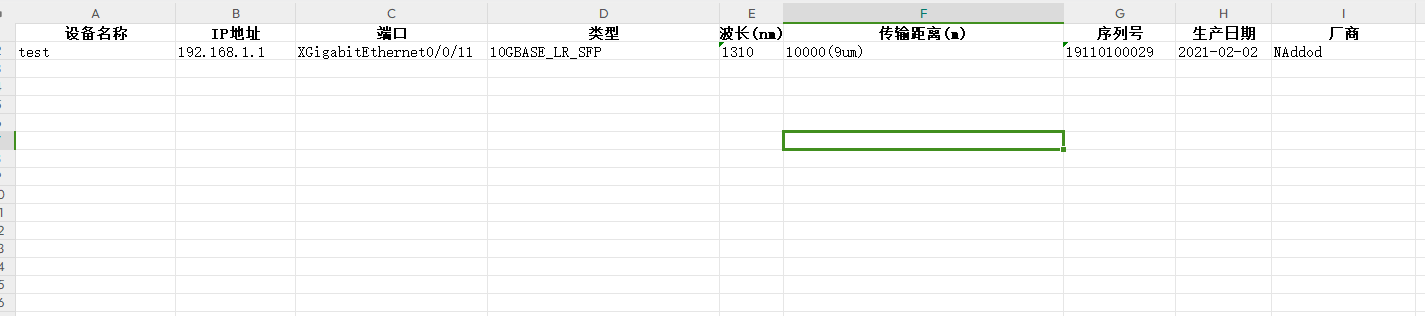
  • 主要采集的信息有
    image.png

准备环境

  • Python3.12.0
    • 第三方库
      • netmiko 连接交换机执行命令
      • re 正则表达式,来筛选信息
      • openpyx 读取和写入Excel
      • contextlib 读取和写入文件,当然,它不只有这个功能
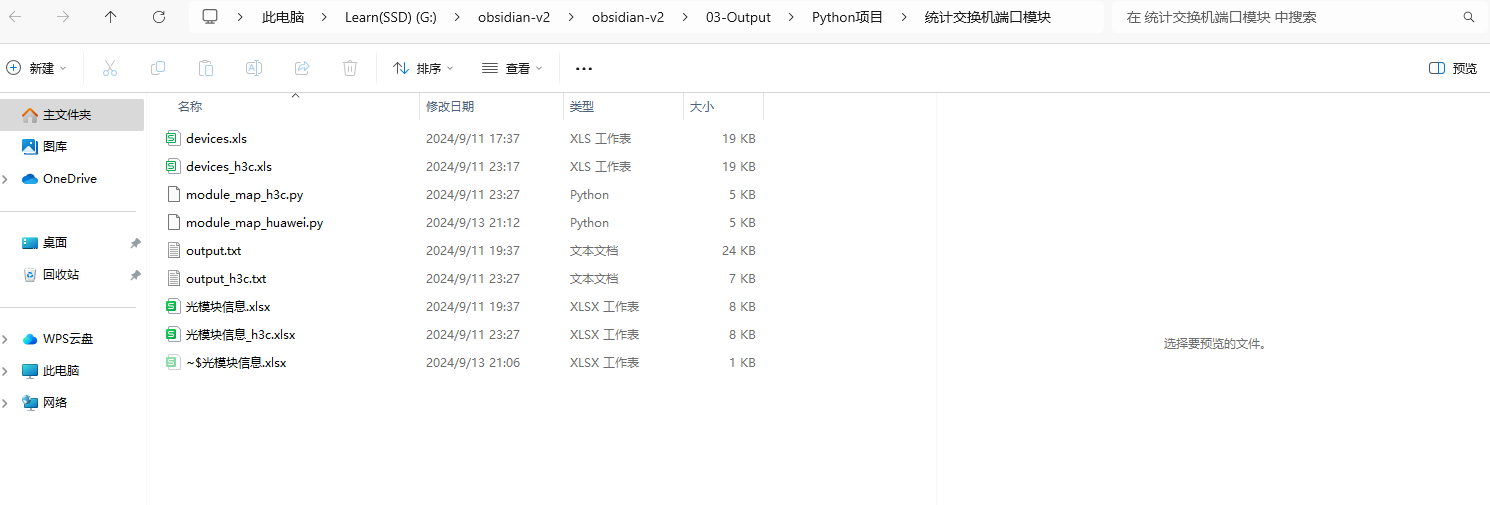
  • 目录结构如下(其实都在根目录~~~)
    image.png

主要思路整理

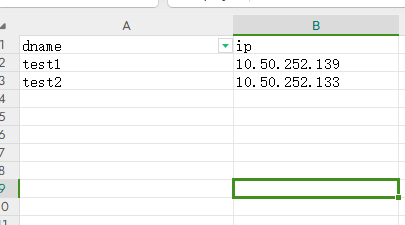
  1. 将设备名称和IP信息写入到一个Excel表格中,然后遍历这个表格到字典

    1. 表格内容如下
      image.png  | 600
  2. 使用for循环去轮流操作这些设备

  3. 使用Netmiko模块来连接设备,并将光模块信息输出到文件里面

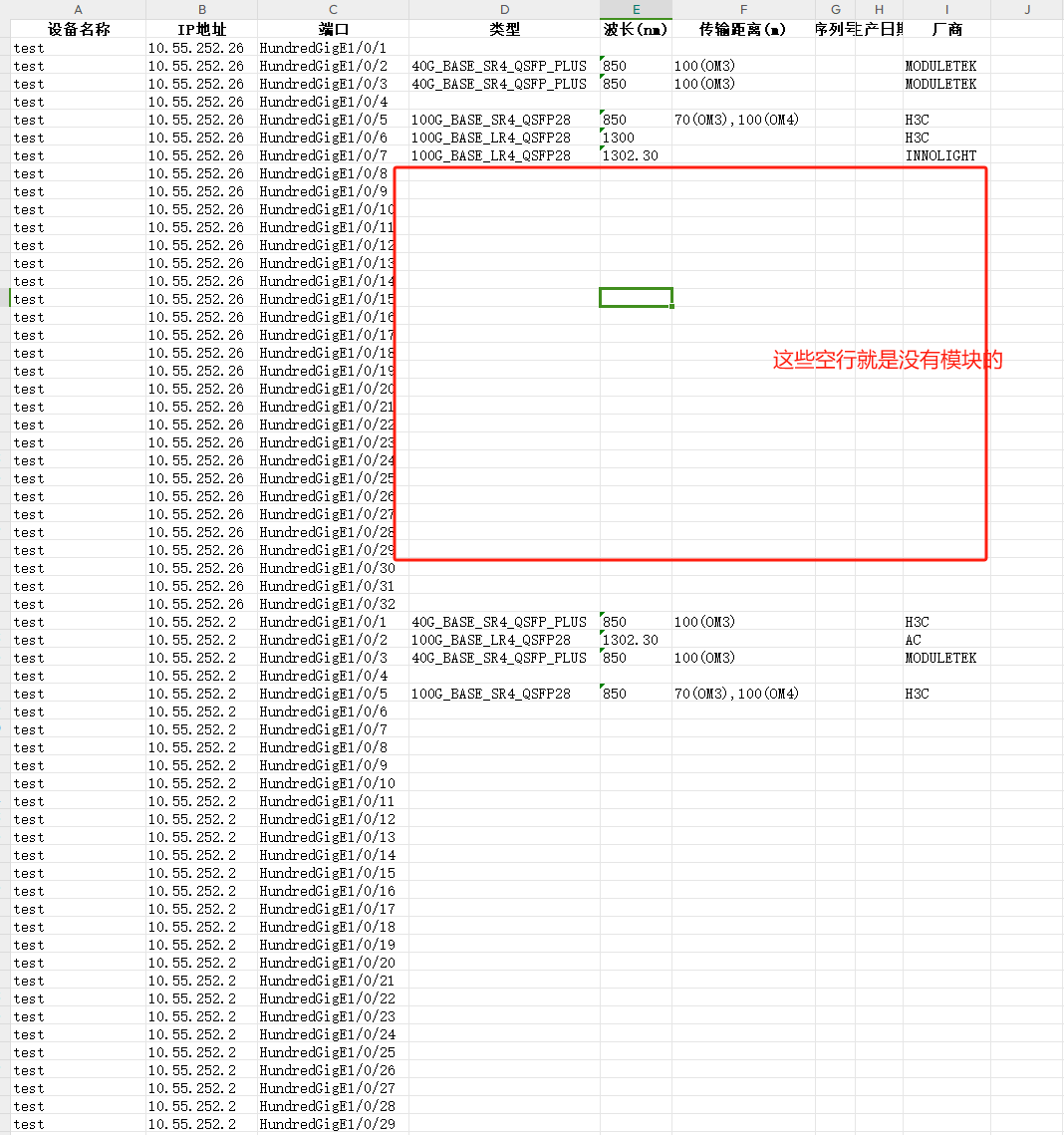
    1. 其中输出光模块信息的命令,华为有命令直接输出有模块的端口,而华三会将有模块和没模块的都生成出来,所以这些信息自己还得修改下,不过也很简单,删除空行就行了
    2. H3C看光模块Sn的命令也是另外的命令,所以H3C采集不到Sn信息
    3. 华为获取有光模块的端口以及端口信息dis transceiver | after 5 include information
    4. 华三获取光模块信息 dis transceiver interface  | exclude ab
  4. 使用正则表达式来筛选信息,写入到表格里面

脚本实现

使用AI生成,笔者只是稍加修改

华为

1
2
3
4
5
6
7
8
9
10
11
12
13
14
15
16
17
18
19
20
21
22
23
24
25
26
27
28
29
30
31
32
33
34
35
36
37
38
39
40
41
42
43
44
45
46
47
48
49
50
51
52
53
54
55
56
57
58
59
60
61
62
63
64
65
66
67
68
69
70
71
72
73
74
75
76
77
78
79
80
81
82
83
84
85
86
87
88
89
90
91
92
93
94
95
96
97
98
99
100
101
102
103
104
105
106
107
108
109
110
111
112
113
114
115
116
117
118
119
120
121
122
123
124
from contextlib import redirect_stdout
from netmiko import ConnectHandler
import re
import openpyxl
from openpyxl.styles import Font, Alignment

def output_txt():

# 读取设备信息表格
device_info = pd.read_excel('devices.xls')

# 定义交换机连接信息的模板
connection_params = {
'device_type': 'huawei',
'username': 'test', # 替换为您的用户名
'password': '123', # 替换为您的密码
}

# 用于存储结果的列表
results = []

# 遍历设备信息并获取光模块信息
for index, row in device_info.iterrows():
dname = row['dname']
ip = row['ip']

# 更新连接参数中的IP地址
connection_params['host'] = ip

try:
# 建立与交换机的连接
connection = ConnectHandler(**connection_params)

# 执行命令以获取光模块信息
command = 'dis transceiver | after 5 include information'
output = connection.send_command(command)
file = open('output.txt', 'a', encoding='utf-8')
with redirect_stdout(file):
print(f"Output from {dname} ({ip}):\n{output}\n")
file.close()

except Exception as e:
print(f"连接到 {dname} ({ip}) 失败: {e}")

finally:
# 确保断开连接
try:
connection.disconnect()
except:
pass


def parse_transceiver_info(output):
results = []
device_name = ""
ip_address = ""

for line in output.split('\n'):
if line.startswith("Output from"):
match = re.search(r"Output from (\S+) \((\S+)\):", line)
if match:
device_name = match.group(1)
ip_address = match.group(2)
elif "transceiver information:" in line:
port = line.split()[0]
info = {"设备名称": device_name, "IP地址": ip_address, "端口": port}
results.append(info)
elif ":" in line:
key, value = line.split(":", 1)
key = key.strip()
value = value.strip()
if key == "Transceiver Type":
results[-1]["类型"] = value
elif key == "Wavelength(nm)":
results[-1]["波长(nm)"] = value
elif key == "Transfer Distance(m)":
results[-1]["传输距离(m)"] = value
elif key == "Manu. Serial Number":
results[-1]["序列号"] = value
elif key == "Manufacturing Date":
results[-1]["生产日期"] = value
elif key == "Vendor Name":
results[-1]["厂商"] = value

return results

def export_to_excel(data, filename):
wb = openpyxl.Workbook()
ws = wb.active
ws.title = "光模块信息"

headers = ["设备名称", "IP地址", "端口", "类型", "波长(nm)", "传输距离(m)", "序列号", "生产日期", "厂商"]
for col, header in enumerate(headers, start=1):
cell = ws.cell(row=1, column=col, value=header)
cell.font = Font(bold=True)
cell.alignment = Alignment(horizontal='center')

for row, item in enumerate(data, start=2):
for col, key in enumerate(headers, start=1):
ws.cell(row=row, column=col, value=item.get(key, ""))

for column in ws.columns:
max_length = 0
column_letter = column[0].column_letter
for cell in column:
try:
if len(str(cell.value)) > max_length:
max_length = len(cell.value)
except:
pass
adjusted_width = (max_length + 2)
ws.column_dimensions[column_letter].width = adjusted_width

wb.save(filename)

# 主程序
if __name__ == "__main__":
output_txt()
with open("output.txt", "r", encoding="utf-8") as file:
output = file.read()

transceiver_info = parse_transceiver_info(output)
export_to_excel(transceiver_info, "光模块信息.xlsx")
print("光模块信息已成功导出到光模块信息.xlsx")

H3C

1
2
3
4
5
6
7
8
9
10
11
12
13
14
15
16
17
18
19
20
21
22
23
24
25
26
27
28
29
30
31
32
33
34
35
36
37
38
39
40
41
42
43
44
45
46
47
48
49
50
51
52
53
54
55
56
57
58
59
60
61
62
63
64
65
66
67
68
69
70
71
72
73
74
75
76
77
78
79
80
81
82
83
84
85
86
87
88
89
90
91
92
93
94
95
96
97
98
99
100
101
102
103
104
105
106
107
108
109
110
111
112
113
114
115
116
117
118
119
120
121
122
123
124
125
126
127
import sys
from contextlib import redirect_stdout
import pandas as pd
from netmiko import ConnectHandler
import re
import openpyxl
from openpyxl.styles import Font, Alignment

def output_txt():

# 读取设备信息表格
device_info = pd.read_excel('devices_h3c.xls')

# 定义交换机连接信息的模板
connection_params = {
'device_type': 'hp_comware',
'username': 'test', # 替换为您的用户名
'password': '123', # 替换为您的密码
}

# 用于存储结果的列表
results = []

# 遍历设备信息并获取光模块信息
for index, row in device_info.iterrows():
dname = row['dname']
ip = row['ip']

# 更新连接参数中的IP地址
connection_params['host'] = ip

try:
# 建立与交换机的连接
connection = ConnectHandler(**connection_params)

# 执行命令以获取光模块信息
command = 'dis transceiver interface | exclude ab'
output = connection.send_command_timing(command, delay_factor=2)
print(output)
file = open('output_h3c.txt', 'a', encoding='utf-8')
with redirect_stdout(file):
print(f"Output from {dname} ({ip}):\n{output}\n")
file.close()

except Exception as e:
print(f"连接到 {dname} ({ip}) 失败: {e}")

finally:
# 确保断开连接
try:
connection.disconnect()
except:
pass


def parse_transceiver_info(output):
results = []
device_name = ""
ip_address = ""

for line in output.split('\n'):
if line.startswith("Output from"):
match = re.search(r"Output from (\S+) \((\S+)\):", line)
if match:
device_name = match.group(1)
ip_address = match.group(2)
elif "transceiver information:" in line:
port = line.split()[0]
info = {"设备名称": device_name, "IP地址": ip_address, "端口": port}
results.append(info)
elif ":" in line:
key, value = line.split(":", 1)
key = key.strip()
value = value.strip()
if key == "Transceiver Type":
results[-1]["类型"] = value
elif key == "Wavelength(nm)":
results[-1]["波长(nm)"] = value
elif key == "Transfer Distance(m)":
results[-1]["传输距离(m)"] = value
elif key == "Manu. Serial Number":
results[-1]["序列号"] = value
elif key == "Manufacturing Date":
results[-1]["生产日期"] = value
elif key == "Vendor Name":
results[-1]["厂商"] = value

return results

def export_to_excel(data, filename):
wb = openpyxl.Workbook()
ws = wb.active
ws.title = "光模块信息"

headers = ["设备名称", "IP地址", "端口", "类型", "波长(nm)", "传输距离(m)", "序列号", "生产日期", "厂商"]
for col, header in enumerate(headers, start=1):
cell = ws.cell(row=1, column=col, value=header)
cell.font = Font(bold=True)
cell.alignment = Alignment(horizontal='center')

for row, item in enumerate(data, start=2):
for col, key in enumerate(headers, start=1):
ws.cell(row=row, column=col, value=item.get(key, ""))

for column in ws.columns:
max_length = 0
column_letter = column[0].column_letter
for cell in column:
try:
if len(str(cell.value)) > max_length:
max_length = len(cell.value)
except:
pass
adjusted_width = (max_length + 2)
ws.column_dimensions[column_letter].width = adjusted_width

wb.save(filename)

# 主程序
if __name__ == "__main__":
output_txt()
with open("output_h3c.txt", "r", encoding="utf-8") as file:
output = file.read()

transceiver_info = parse_transceiver_info(output)
export_to_excel(transceiver_info, "光模块信息_h3c.xlsx")
print("光模块信息已成功导出到光模块信息_h3c.xlsx")

统计出来的模块信息展示

华为

image.png

华三

image.png